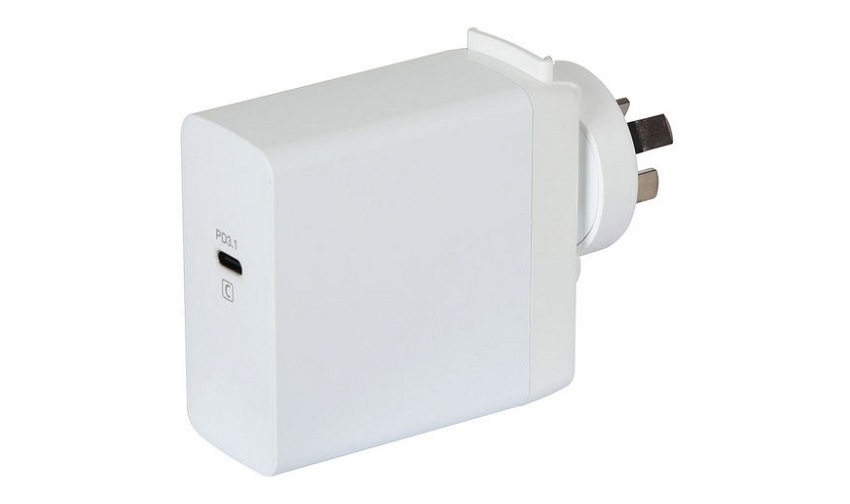
Choosing the right power adapter is essential for keeping your MacBook Pro or MacBook Air charged efficiently and safely. For Australian customers seeking a hassle‑free experience, Campad Electronics offers expert guidance on selecting the correct charger for any MacBook model. Known for high‑quality products, fast delivery, great value and knowledgeable advice, Campad Electronics ensures you get the proper wattage and cable combination to match your laptop’s requirements. Even if you’re not in Australia it’s worthwhile looking at their Macbook charger page to help you work out which charger will suit your Macbook.
Use this guide to understand the specific adapter needs for each MacBook Pro size and also check out Campad Electronics to help you make the perfect purchase.
Overview
Apple’s MacBook Pro lineup relies on USB‑C Power Delivery (PD) adapters that match each model’s power‑draw requirements. Using the recommended wattage ensures optimal charging speed, prevents battery drain under load and maintains long‑term battery health. Higher‑wattage adapters are safe to use; the laptop draws only the power it needs.
13-inch MacBook Pro
The 13‑inch MacBook Pro, whether the M2 model released in 2022 or the Intel‑based version from 2020, both use the 61W USB‑C Power Adapter as the standard charger and support fast‑charge up to 61W. With this adapter the laptop can be fully charged in roughly two hours, reaching about 50% in approximately 45 minutes.
Although higher‑wattage adapters such as 96W or 140W can be used safely, they do not reduce the charging time beyond what the 61W adapter provides.
| Model (Intel/M‑series) | Standard Adapter | Fast‑Charge Capability | Typical Charge Rate |
| 13-inch (M2, 2022) | 61W USB‑C Power Adapter | Supported (up to 61W) | Full charge in ~2h; 50% in ~45 min |
| 13-inch (Intel, 2020) | 61W USB‑C Power Adapter | Supported (up to 61W) | Similar to M‑series |
- The 61W adapter is the minimum for full‑speed charging. Using a 96W or 140W adapter will not charge faster, but it will safely supply the required power.
14-inch MacBook Pro (2021‑2023)
The 14‑inch MacBook Pro (M1‑Pro, 2021) and the 14‑inch MacBook Pro (M2‑Pro, 2023) both recommend either a 96W USB‑C Power Adapter or a 140 W USB‑C Power Adapter; fast charging requires an adapter of at least 96W (PD 3.1) and will charge the battery from 0% to 50% in roughly 30 minutes when paired with a USB‑C‑to‑MagSafe 3 cable or a high‑quality USB‑C cable rated for 100W (such as Apple’s 2m USB‑C cable).
Using a lower‑power adapter, such as a 61 W unit, will still charge the machine but at standard rates and under heavy workloads the battery may discharge faster than it charges.
| Model (M1‑Pro / M1‑Max / M2‑Pro) | Recommended Adapter | Fast‑Charge Threshold | Approx. 0‑50% Time |
| 14-inch (M1‑Pro, 2021) | 96W USB‑C Power Adapter or 140W USB‑C Power Adapter | ≥ 96W (PD 3.1) | ~30 min |
| 14-inch (M2‑Pro, 2023) | 96W USB‑C Power Adapter or 140W USB‑C Power Adapter | ≥ 96W (PD 3.1) | ~30 min |
- Fast charging requires a 96W (or higher) USB‑C adapter and a USB‑C to MagSafe 3 cable or a high‑quality USB‑C charge cable (e.g. Apple 2m USB‑C cable rated for 100W).
- Using a 61W adapter will charge the machine, but the rate drops to standard levels and heavy workloads may cause battery drain.
16-inch MacBook Pro (2021‑2023)
All three 16-inch MacBook Pro models, the 2021 M1 Max, the 2023 M2 Max and the 2024 M3 Pro, use the same 140W USB‑C Power Adapter (PD 3.1) as the recommended charger, support a fast‑charge threshold of 140W and can reach roughly 0 % to 50 % battery in about 30 minutes.
Fast charging is only achieved when the 140W adapter is paired with a MagSafe 3 cable (or a Thunderbolt 5 cable for future M4‑based models). Using lower‑wattage adapters, such as a 96W unit, will still charge the laptop but more slowly and may not keep up with intensive workloads.
| Model (M1‑Max / M2‑Max / M3‑Pro) | Recommended Adapter | Fast‑Charge Threshold | Approx. 0‑50% Time |
| 16-inch (M1‑Max, 2021) | 140W USB‑C Power Adapter (PD 3.1) | 140W | ~30 min |
| 16-inch (M2‑Max, 2023) | 140W USB‑C Power Adapter (PD 3.1) | 140W | ~30 min |
| 16-inch (M3‑Pro, 2024) | 140W USB‑C Power Adapter (PD 3.1) | 140W | ~30 min |
- Fast charging is only achieved with the 140W adapter paired with the MagSafe 3 cable or a Thunderbolt 5 cable (for M4‑based models).
- Lower‑wattage adapters (e.g. 96W) will charge the laptop but at a slower pace and may not keep up with intensive tasks.
Choosing the Right Power Adapter
Ideally you should match or exceed the wattage listed for the specific model, using an Apple‑certified or reputable third‑party USB‑C PD adapter that supports the required power profile (PD 3.0/3.1). Pair the adapter with a cable rated for the adapter’s maximum wattage; Apple’s 2m USB‑C charge cable supports up to 100W, while the MagSafe 3 cable handles the full 140W.
- Match or exceed the wattage listed for the specific model.
- Use Apple‑certified or reputable third‑party USB‑C PD adapters that support the required power profile (PD 3.0/3.1).
- Pair the adapter with a cable rated for the adapter’s maximum wattage, Apple’s 2m USB‑C charge cable supports up to 100W, while the MagSafe 3 cable handles the full 140W.
Fast‑Charging Mechanics
Fast charging, as defined by Apple, means reaching roughly 50% battery in about 30 minutes. The laptop’s internal power‑management system negotiates voltage and current with the adapter; if the adapter cannot meet the fast‑charge threshold, the system defaults to standard charging.
Fast charging is most noticeable when the machine is idle or under light load, whereas heavy CPU or GPU usage can still limit the net charge rate.
- Fast charging is defined by Apple as reaching ≈50% battery in ~30 minutes.
- The laptop’s internal power management negotiates the voltage/current with the adapter; if the adapter can’t meet the fast‑charge threshold, the system falls back to standard charging.
- Fast charging is most noticeable when the machine is idle or under light load; heavy CPU/GPU usage can still limit the net charge rate.
Using Higher‑Wattage Power Adapters Safely
Connecting a 96W or 140W adapter to a lower‑wattage MacBook model (such as the 13-inch) is safe because the computer draws only the power it requires; however, you should not attach multiple adapters at the same time, as the system will simply draw power from the source delivering the highest wattage and ignore the others.
- Connecting a 96W or 140W adapter to a lower‑wattage model (e.g. 13-inch) is safe, the MacBook draws only what it requires.
- Do not connect multiple adapters simultaneously; the system will draw power from the source delivering the highest wattage, ignoring the others.
Important Points
Apple’s PD controllers prevent over‑current, so higher‑wattage adapters will not damage the battery; for 96W+ charging, use the included MagSafe 3 cable or a certified USB‑C cable rated for ≥100W and non‑Apple chargers are acceptable if they meet USB‑C PD specifications and are from reputable manufacturers.
- Safety: Apple’s PD controllers prevent over‑current; higher‑wattage adapters will not damage the battery.
- Cable Selection: For 96W+ charging, use the included MagSafe 3 cable or a certified USB‑C cable rated for ≥100W.
- Non‑Apple Chargers: Acceptable if they meet USB‑C PD specifications and are from reputable manufacturers.
Key Takeaways
- 13-inch MacBook Pro → 61W adapter (standard speed).
- 14-inch MacBook Pro → 96W (or 140W) adapter for fast charging.
- 16-inch MacBook Pro → 140W adapter required for fast charging.
Selecting the appropriate wattage adapter and matching cable ensures the fastest, safest charge for each MacBook Pro model.
Final Thoughts
Choosing the right wattage adapter is essential for optimal performance, battery health and fast‑charging capability across every MacBook Pro and MacBook Air model. By matching or exceeding the recommended power rating and pairing it with a certified cable, you ensure safe, efficient charging whether you’re at home, in the office or on the go.
For Australian customers looking for the perfect charger, Campad Electronics offers expert guidance, high‑quality USB‑C PD adapters and reliable cables tailored to each MacBook configuration. With fast delivery, great value and knowledgeable support, Campad Electronics makes it easy to select the exact charger you need for any MacBook Pro or MacBook Air.
What charging speed can I expect with a 96 W adapter compared to a 61W adapter?
A 96W adapter can charge a 14-inch MacBook Pro to ~50% in about 30 minutes, while a 61W adapter typically reaches 50% in 45–60 minutes and takes longer to reach a full charge.
Will a 96W charger damage a MacBook Pro that originally came with a 61W charger?
No. The MacBook draws only the power it needs, so using a higher‑wattage adapter is safe.
Can I use a 61W adapter on a 14-inch or 16-inch MacBook Pro?
Yes, but charging will be slower and under heavy workloads the battery may still drain because the adapter can’t supply enough power for both operation and charging.
Which MacBook models officially support “fast charging”?
14-inch MacBook Pro (2021‑2023) fast charge with 96W or higher.
16-inch MacBook Pro (2021‑2023) fast charge with 140W. Older 13-inch models support fast charge with 61W or 67W adapters.
Do I need a specific cable for fast charging?
Use the Apple USB‑C to MagSafe 3 cable or a USB‑C charge cable rated for the adapter’s wattage (e.g. 96W cable for a 96W adapter, 240W cable for a 140 W adapter).
Will connecting two chargers to a MacBook Pro charge it faster?
No. The MacBook charges from the single source that provides the highest power; additional adapters are ignored.
Is it safe to use a non‑Apple USB‑C charger with my MacBook Pro?
Yes, provided the charger meets the required wattage, follows USB‑C Power Delivery specifications and comes from a reputable, certified manufacturer.
Can I use a 96W charger to charge an iPhone?
Yes. The iPhone’s internal power‑management system will draw only the amount of power it needs, so a 96W adapter is safe for iPhone charging.
What happens if I use a charger with lower wattage than Apple’s recommendation?
The MacBook will charge more slowly and under demanding tasks the battery may continue to discharge because the adapter cannot keep up with power consumption.
How does the 140W adapter differ from the 96 W adapter for the 16‑inch MacBook Pro?
The 140W adapter (PD 3.1) can deliver up to 140W over a compatible cable, enabling the 16-inch model to reach 50% charge in ~30 minutes, whereas a 96W adapter cannot achieve the same fast‑charge rate.
Do I need a MagSafe 3 port to benefit from fast charging?
No. Fast charging works over USB‑C as long as the adapter, cable and MacBook all support the required wattage. MagSafe 3 is simply an alternative connector.
What is the recommended charger for a 13‑inch MacBook Pro (M2, 2022)?
Apple’s 61W USB‑C Power Adapter is the optimal choice; a 67W adapter can be used for slightly faster charging, while a higher‑wattage adapter will not provide a noticeable speed increase.